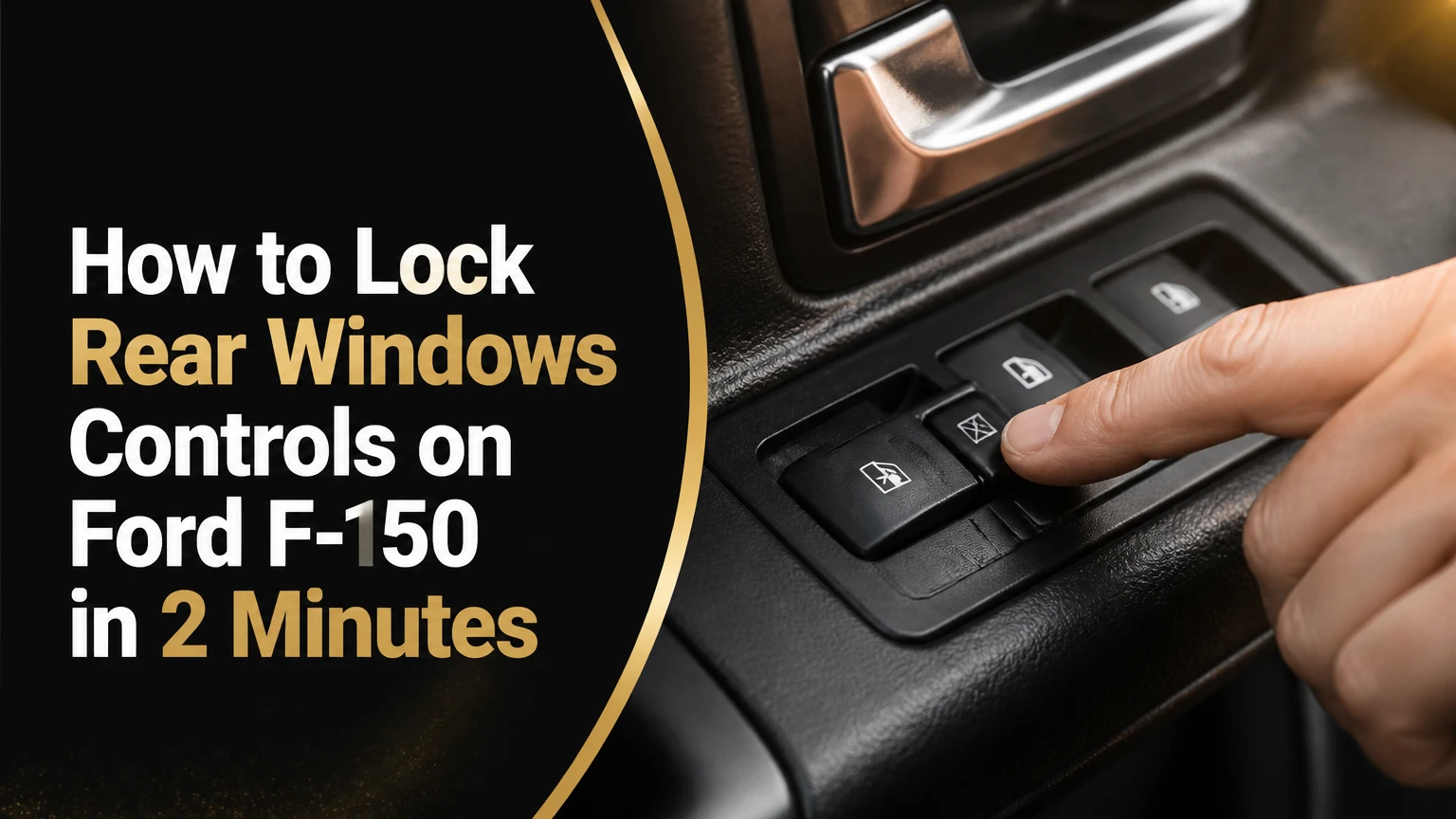
To lock the rear window controls on a Ford F-150, switch the ignition or accessory power on, then press the window-lock button on the driver’s door beside the master window switches. The rear-door window buttons should stop operating, while the driver’s master panel should continue controlling the rear windows. Press the button again to restore passenger control.
Key Facts
The F-150 window-lock button disables the rear passenger-door window switches, not the driver’s master controls.
The button is located on the driver’s door switch panel and commonly shows a window symbol with a slash or cross.
The indicator light, if fitted, confirms the lockout state, but its color and operation vary by model year.
Window lockout does not prevent a passenger from opening a rear door from inside.
The rear window lockout normally operates both rear passenger windows together rather than one side independently.
A rear window that works from the driver’s panel but not the rear door usually points toward lockout activation, a switch fault, or door wiring.
How to Lock Rear Windows Controls on Ford F-150
Pressing the window-lock button is the correct method on F-150 models equipped with rear power windows. The complete operation usually takes less than two minutes and requires no tools, but the decisive check is whether the rear-door switches stop working while the driver’s switches still operate normally.
Ford’s owner manuals describe the control in substantially the same way across many F-150 years. A typical manual instruction is: “Press the control to lock or unlock the rear window controls.” The exact icon, button shape, and indicator behavior can differ, so the manual for the truck’s model year takes precedence over a generic diagram.
Before You Start
| Item | Typical requirement | Why it matters |
|---|---|---|
| Vehicle state | Ignition on or accessory mode | Supplies power to the window circuit |
| Time | 30-120 seconds | Includes the functional check |
| Tools | None | Lockout is a normal driver control |
| Location | Driver’s door armrest | Houses the master switch panel |
| Required equipment | Rear power windows | Manual-crank windows have no electrical lockout |
Keep the truck stationary while testing the controls. If children or pets are near an open window, close the glass first, because pressing the lockout switch does not automatically raise any window.
Step 1: Turn On Accessory Power
Turn the ignition key to the RUN position, or press the engine-start button without pressing the brake pedal if the F-150 uses push-button starting. Some trucks allow the window controls to work briefly after the ignition is switched off, but accessory power gives the most consistent test condition.
Do not start the engine solely to operate the lockout. The window system normally needs electrical power, not engine operation.
Success checkpoint: The window-switch backlighting or other accessory functions are active.
Common mistake: Pressing the start button while holding the brake starts the engine instead of selecting accessory mode. That does not harm the lockout function, but it is unnecessary.
Step 2: Find the Driver-Door Master Panel
Look at the driver’s armrest. The master panel usually contains four window switches, a driver-window control with an auto function on some trims, and a smaller window-lock button.
The lock button commonly has a graphic representing a window with an X, slash, or restriction mark. It is usually near the four window switches, although its exact position changes between switch-panel designs.
Success checkpoint: You have identified a dedicated button separate from the door-lock and mirror controls.
Common mistake: Confusing the window-lock button with the central door-lock button. The door-lock control locks doors; the window-lock control disables rear window switches.
Step 3: Press the Window-Lock Button
Press the window-lock button once. A push-button design generally toggles between locked and unlocked states, so holding the button is not normally required.
On some F-150 switch panels, an indicator illuminates when the rear controls are locked. On others, the button has limited or no obvious illumination. A missing light does not prove that the lockout has failed.
Success checkpoint: The button changes position, tactile resistance, or indicator status, and the rear door switches no longer control the glass.
Common mistake: Assuming the button must be held down. Test a single press first; repeated or prolonged pressing can make the state harder to identify.
Step 4: Verify the Lockout From the Rear Door
With the window closed, briefly press a rear-door window switch. The glass should remain stationary when the lockout is engaged.
Do not test by repeatedly cycling the window while a child or animal is close to the opening. A short switch press is enough to establish whether the rear control is disabled.
Success checkpoint: The rear-door switch produces no window movement, while no warning message appears on the instrument cluster.
Common mistake: Testing a rear window that already has a separate electrical fault and concluding that the lockout works. Always perform the driver-panel check in the next step.
Step 5: Confirm Driver Control Remains Available
Use the corresponding rear-window switch on the driver’s master panel. The driver should still be able to lower and raise that rear window.
The lockout is designed to remove local passenger control, not driver authority. If the driver’s switch also fails, the problem may involve a fuse, power supply, master switch, wiring, body control electronics, motor, or regulator rather than a normal lockout state.
Success checkpoint: The driver’s panel moves both rear windows, but the rear-door switches do not.
Common mistake: Treating a window that moves slowly as a lockout problem. Slow movement usually suggests mechanical drag, low voltage, worn motor components, or regulator resistance.
Step 6: Restore Rear Passenger Control
Press the same window-lock button a second time. The indicator, if equipped, should turn off or change state, and the rear-door switches should operate again.
Test one rear switch briefly if passenger control needs to be restored. If the rear switches remain inactive while the driver controls work, continue to the troubleshooting section rather than repeatedly forcing the button.
Success checkpoint: A rear passenger can operate the window from the rear door.
Common mistake: Assuming the lockout resets when the truck is restarted. Many F-150s retain the last selected state until the button is pressed again.
What Does the F-150 Window-Lock Indicator Mean?
The indicator confirms the lockout state only when the truck’s switch design uses an indicator lamp. Ford has used different button layouts, backlighting arrangements, and indicator behaviors, so a red, amber, white, or unlit button cannot be treated as a universal F-150 standard.
Use window behavior as the primary confirmation. If the rear switches are disabled and the driver’s panel still operates both windows, the lockout is functioning even if the lamp is difficult to see in daylight.
| Observed condition | Likely interpretation | Next check |
|---|---|---|
| Rear switches dead, driver controls work | Normal lockout or rear-switch fault | Press lockout once and retest |
| Rear and driver controls dead | Power, fuse, wiring, module, or motor fault | Check vehicle-specific diagnostics |
| Indicator changes, rear switches still work | Wrong button, failed switch, or trim-specific behavior | Confirm icon and owner’s manual |
| No indicator, rear switches disabled | Normal design on some trucks | Use functional test |
| One rear window works, one fails | Local motor, regulator, switch, or wiring issue | Compare both sides |
The driver’s control is the most useful diagnostic reference. A lockout switch cannot explain why only one rear window fails from both control locations.
Which F-150 Model Years Have Rear Window Lockout?
Most F-150s with factory rear power windows provide a rear window-lock function, but Ford did not use one universal switch, fuse, or circuit design across every generation. The body style and trim also matter: a regular cab has no rear passenger-door windows, while SuperCab and SuperCrew trucks may have different rear-door harnesses and switch arrangements.
| F-150 period | Common configuration | What may differ | Verification method |
|---|---|---|---|
| 2004-2008 | Separate master switch panel and rocker-style controls | Button shape and circuit arrangement | Owner’s manual and switch icon |
| 2009-2014 | Driver-door master panel with dedicated lockout control | Indicator and trim-level equipment | Rear-switch functional test |
| 2015-2020 | Electronic door controls with rear-window lockout on equipped trucks | Fuse location and body-control architecture | Vehicle-specific manual |
| 2021-present | Revised switch panels and electronic modules | Layout, software, indicator behavior | Truck manual or Ford service information |
The broad function is stable: the driver disables rear passenger controls. The detailed electrical explanation is not stable enough to generalize. A statement such as “every F-150 uses a 10-amp BCM fuse” is unreliable because fuse assignments vary by year, engine, body style, market, and option package.
Can You Lock Only One Rear Window?
The factory window-lock function normally disables both rear passenger window switches together. It is not designed to lock only the left or right rear window, and Ford does not generally provide a separate driver-controlled lockout for a single passenger side.
That limitation matters when one rear passenger is an adult and another is a young child. The practical choices are to leave both controls available, lock both rear controls, or use supervision and physical positioning. Avoid aftermarket modifications that interrupt a single window circuit unless a qualified technician confirms that the change preserves overload protection and factory wiring integrity.
The driver can still operate each rear window independently from the master panel on equipped trucks. The lockout controls passenger access, not the driver’s selection of individual windows.
Window Lockout Versus Child Door Locks
Window lockout prevents electrical operation of the glass. Rear child-safety door locks prevent occupants from opening the rear doors from the inside, so the two features address different hazards and should not be confused.
| Feature | Controls | Prevents | Does not prevent |
|---|---|---|---|
| Window lockout | Rear window switches | Passenger operation of rear glass | Rear-door opening |
| Mechanical child door lock | Inside rear door handle | Interior door release | Window movement |
| Central power lock | Door latch locking system | Normal electrical unlocking in some states | Manual emergency procedures |
| Driver supervision | Occupant behavior | Unsupervised use when actively monitored | A child reaching an unlocked control |
Ford’s child-safety door lock is typically located on the inside edge of each rear door. The door must be open to access it, and the control is turned with the key blade or another specified tool. Follow the door label and owner’s manual because the direction and operating method vary.
Child door locks can make emergency evacuation more difficult. Adults should know how the rear doors are secured, and caregivers should not use the window lock as a substitute for appropriate supervision or a properly fitted child restraint.
Why Are the Rear Window Controls Still Working?
Rear window switches that continue working after the button is pressed usually indicate that the lockout is not engaged, the wrong control was pressed, or the switch panel has a fault. The fastest diagnosis is to compare both control locations, observe the indicator if present, and check whether the problem affects both rear doors.
Use this sequence:
- Press the window-lock button once, then wait two seconds.
- Test one rear-door switch with a short press.
- Test the same window from the driver’s master panel.
- Test the opposite rear window from both locations.
- Turn accessory power off, wait 30 seconds, and retest.
- Consult the exact owner’s manual if the switch icon or behavior differs.
If both rear switches operate normally, the lockout was probably toggled to the unlocked state. If one rear switch remains active but the other does not, suspect a local switch or wiring issue rather than the shared lockout button.
Diagnostic Patterns
| Symptom | Most probable area | Appropriate action |
|---|---|---|
| Both rear switches work after lockout press | Lockout not toggled or wrong button | Identify the window-lock icon |
| Both rear switches dead, driver panel works | Lockout active or master-panel fault | Toggle once and verify |
| One rear window dead everywhere | Local switch, motor, regulator, fuse branch, or wiring | Inspect and diagnose that side |
| All four windows dead | Main power, fuse, battery voltage, module, or master panel | Stop repeated testing and inspect power supply |
| Window moves from driver panel only | Rear switch circuit or lockout path | Test switch and harness |
Do not assume a particular fuse number. Ford fuse charts are year-specific, and replacing a fuse with a larger rating can damage wiring or create a fire risk. Use the amperage and location printed in the truck’s manual or fuse-box cover.
What If the Driver Panel Also Stops Operating the Rear Windows?
When the driver’s master panel cannot move either rear window, the fault is broader than a normal passenger lockout. Check battery condition, relevant fuses, visible door-jamb wiring, connector seating, and any diagnostic messages before replacing the master switch.
A basic inspection can identify simple problems:
- Confirm the battery is not severely discharged.
- Check the vehicle-specific power-window fuse with the correct rating.
- Inspect wiring where the driver’s door flexes through its rubber boot.
- Look for water intrusion, corrosion, or a loose master-switch connector.
- Listen for motor noise when the driver’s switch is pressed.
- Stop if a fuse blows again immediately.
A silent window can indicate no power, a failed switch, an open circuit, or a failed motor. A clicking or humming motor with no glass movement points more toward a regulator, cable, guide, or mechanical binding problem.
Professional diagnosis is sensible when multiple doors fail, a replacement fuse opens again, water has entered the door, or the truck displays body-control fault codes. Door modules and networked electronics can require scan-tool testing that a visual inspection cannot provide.
How Do You Reset One-Touch Windows After a Dead Battery?
A common F-150 window relearn procedure is to close the window fully, hold the switch upward for about three seconds, open the window fully, then hold the switch downward for about three seconds. The exact timing and sequence can differ, so use the model-specific owner’s manual if the procedure does not restore automatic operation.
A practical relearn sequence is:
- Turn accessory power on.
- Close the affected window completely.
- Continue holding the switch upward for approximately three seconds.
- Release the switch.
- Open the window completely.
- Continue holding the switch downward for approximately three seconds.
- Release the switch and test one-touch opening and closing.
Keep fingers, tools, and objects away from the window opening. Anti-pinch systems may stop or reverse the glass when resistance is detected, and an incorrectly initialized system may require additional cycling according to Ford’s instructions.
Window relearning addresses automatic travel memory. It does not repair a broken regulator, failed motor, damaged switch, or inactive rear lockout.
How Much Does a Window-Lockout Repair Cost?
A replacement F-150 master window-switch assembly typically costs about $25-$160 for the part, while professional diagnosis and installation commonly bring the total repair to roughly $150-$320. Prices vary substantially with model year, OEM versus aftermarket parts, labor rates, and whether the fault is in the switch panel or door wiring.
| Repair path | Typical parts cost | Typical labor or time | Best use |
|---|---|---|---|
| Clean and reseat connector | $0-$15 | 30-60 minutes DIY | Intermittent or contaminated switch |
| Aftermarket master switch | $25-$55 | 15-45 minutes DIY | Confirmed switch failure |
| OEM master switch | $75-$160 | 30-90 minutes shop time | Exact fit and factory compatibility |
| Door-jamb wiring repair | $10-$80 materials | 1-3 labor hours | Broken flexing wires |
| Dealer diagnosis and repair | $150-$320 typical total | Same day to several days | Module, wiring, or scan-tool faults |
Disconnecting the negative battery cable before removing a door switch can reduce the risk of accidental shorting, but it may erase clock, radio, memory, or window settings. Follow the service procedure for the specific F-150 and wait for any required module shutdown period.
Use plastic trim tools rather than a metal screwdriver. Metal tools can scar the door panel, break retaining clips, and short exposed terminals. Never spray general-purpose lubricant into an electrical switch; use electronics-safe contact cleaner only when the service procedure and switch construction make cleaning appropriate.
Which Safety Approach Fits Your Situation?
The window lockout is most useful when rear occupants may operate the switches without permission. It is less useful as a substitute for a child restraint, door child lock, or direct supervision, and it does not prevent objects from being thrown through an already open window.
| Situation | Recommended setting | Additional measure |
|---|---|---|
| Toddler in a rear car seat | Lock rear windows | Use the correct child restraint |
| Dog in a SuperCrew | Lock rear windows | Secure the animal with a suitable restraint |
| Older children riding alone | Driver’s choice | Explain emergency window operation |
| Adult work crew | Leave unlocked unless needed | Avoid distracting the driver |
| Hot-weather parking | Lock windows before leaving | Never leave children or animals inside |
| Vehicle inspection or service | Unlock if technicians need access | Restore the preferred setting afterward |
A locked window does not make the cabin safe for unattended occupants. Interior temperature can rise rapidly even when outside conditions feel moderate, and the National Highway Traffic Safety Administration warns against leaving children or pets in parked vehicles.
The lockout also does not guarantee that a window cannot move under every electrical fault condition. Treat it as a passenger-control feature, not as a certified isolation switch or anti-theft device.
Common Mistakes and How to Fix Them
Mistaking door locks for window locks
Pressing the door-lock button changes latch status but leaves rear window switches operational. Find the button with the crossed or restricted window symbol on the driver’s switch panel.
Expecting the glass to close automatically
The lockout only changes switch authority. It does not raise open windows, close the sunroof, or activate a global vehicle-locking routine.
Replacing a fuse without checking the circuit
A fuse that opens repeatedly indicates an underlying overload or short. Install only the specified rating and obtain professional diagnosis if the replacement fails again.
Replacing the switch for a one-window failure
A single dead window often has a local fault in the rear switch, motor, regulator, connector, or door harness. Compare the affected side with the working side before buying a master switch.
Confusing loss of auto-up with loss of power
A dead battery can erase window travel calibration while leaving manual window operation available. Perform the relearn procedure before replacing electrical components.
Assuming every F-150 has the same button light
Indicator color, brightness, and even the presence of a dedicated lamp vary. Functional testing and the vehicle manual are more reliable than online photos from another generation.
When Should You Use a Dealer or Auto Electrician?
Use a dealer or qualified automotive electrician when several windows fail simultaneously, a fuse repeatedly blows, the door harness is damaged, water has reached a module, or the truck requires network diagnosis. A switch replacement is reasonable DIY work only when the symptom clearly follows the master panel and the correct replacement part is confirmed by VIN or catalog application.
A technician can test voltage drop, circuit continuity, motor current, switch inputs, and body-control module communication. That sequence prevents a common expensive mistake: replacing a $100 switch when the real fault is a broken wire in the flexing door jamb.
Do not probe unfamiliar module connectors with improvised test leads. Modern F-150 door systems can include low-current signal circuits and communication wiring alongside power-window circuits.
Frequently Asked Questions
Does locking the rear windows lock the rear doors?
No. The F-150 window-lock button disables rear window-switch operation, but it does not engage the mechanical child-safety door locks. To prevent interior rear-door opening, set the child-safety lock on each rear door according to the owner’s manual.
Can the driver still open locked rear windows?
Yes. On F-150 trucks with the factory rear window-lockout feature, the driver’s master switch panel retains control of the rear windows while the rear-door switches are disabled. If the driver panel also stops working, diagnose the electrical system instead of treating the condition as normal lockout behavior.
Why is my F-150 window-lock light not illuminated?
Some F-150 versions have different indicator arrangements, and bright daylight can make a small lamp difficult to see. Test the rear switch and then the driver’s switch. Window behavior is the decisive check when the indicator does not clearly identify the state.
Does the window lock work with the ignition off?
The window-lock state may remain selected with the ignition off, but the switches themselves may not operate without accessory power. Turn the ignition to RUN or accessory mode when confirming whether the lockout has engaged.
Can I add a rear window lock to an F-150 without one?
An aftermarket modification may be possible, but a universal inline switch is not automatically safe for a modern F-150. Circuit design, current protection, connector compatibility, and body-module behavior must be verified by a qualified technician before modification.
Will disconnecting the battery reset the window lock?
Battery disconnection can reset electronic settings or erase one-touch window calibration, but it is not a dependable method for changing the lockout state. Press the dedicated window-lock button and use the vehicle-specific relearn procedure if automatic operation is lost.
The Bottom Line
To lock rear windows controls on Ford F-150, turn on accessory power, press the crossed-window button on the driver’s door, and verify that rear-door switches stop moving the glass while the driver’s panel still works. Press the button again to unlock the controls. Remember that window lockout is separate from child door locks, and use the exact Ford manual for fuse locations, indicator behavior, and year-specific reset instructions.