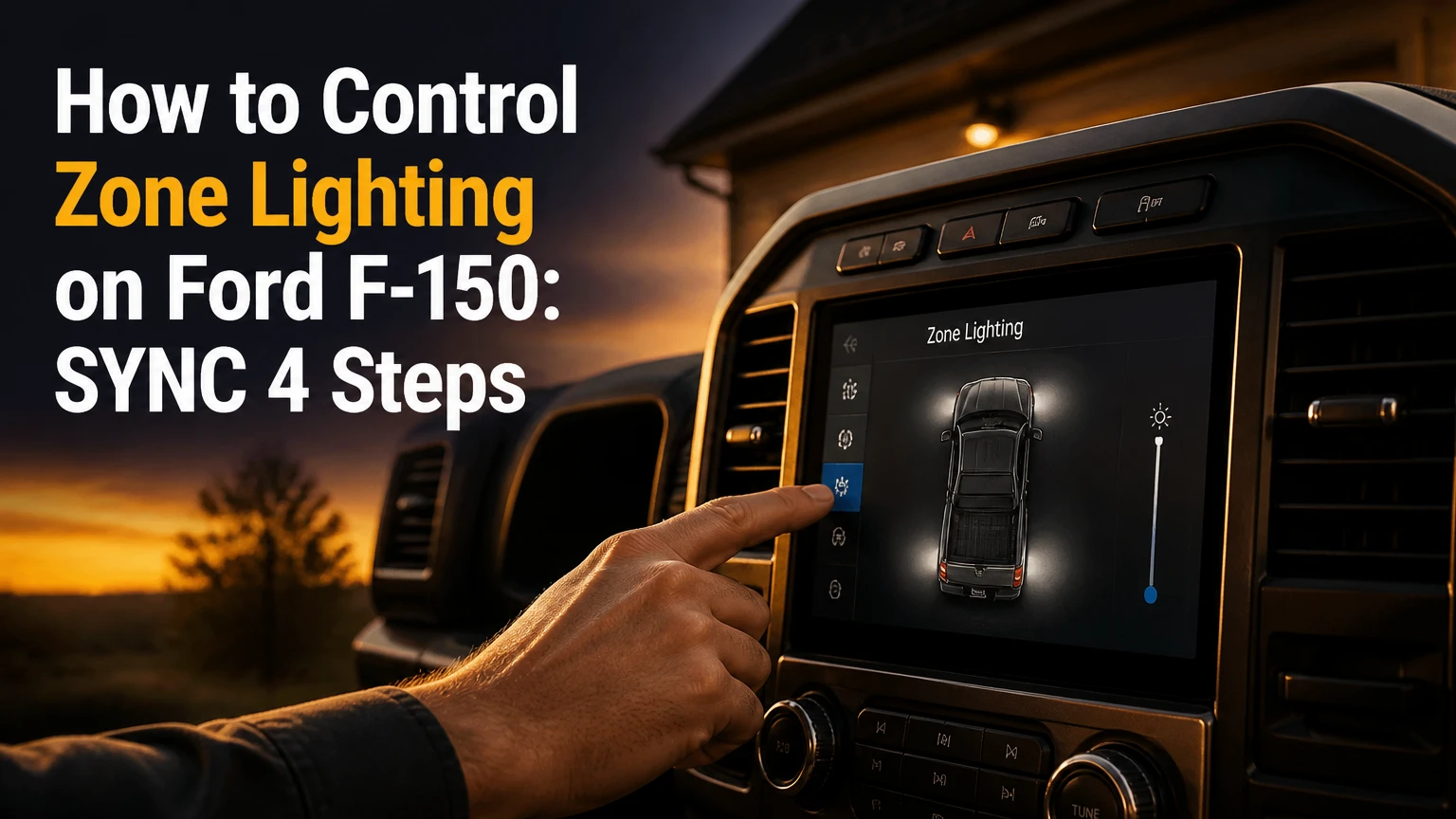
To control Zone Lighting on a Ford F-150, park the truck, open Features on the SYNC 4 touchscreen, select Zone Lighting, press the center power button, then choose All Zones or individual quadrants. Compatible trucks can also use the FordPass app, although equipment, model year, connectivity, and battery condition determine whether remote control works.
Key Facts at a Glance
- Ford F-150 Zone Lighting divides exterior illumination into front, left, right, and rear areas.
- The SYNC 4 procedure normally requires the transmission to be in Park.
- Zone Lighting can operate with the engine off, but the battery management system may stop it early.
- Factory coverage depends on model year, trim, lighting package, body style, and market.
- Software activation cannot create missing mirror lamps, bed lamps, wiring, or incompatible control modules.
- FordPass remote commands require an active vehicle connection and may fail when the truck enters deep sleep.
How to Control Zone Lighting on a Ford F-150
The fastest method is the center touchscreen: select Features, open Zone Lighting, activate the power icon, and select the desired quadrants. The complete process usually takes less than one minute when the truck is parked and the lighting system is supported. The main success factor is factory hardware compatibility, not the touchscreen menu alone.
Before You Start
Check these conditions before troubleshooting the menu:
| Requirement | Typical value or location | Why it matters |
|---|---|---|
| Transmission position | Park, P | Prevents exterior work lighting from operating during movement |
| Control display | SYNC 4 touchscreen | Provides the quadrant graphic and power control |
| Remote control | FordPass with FordPass Connect | Sends commands through the vehicle’s modem |
| Battery condition | Charged 12-volt battery | Low state of charge can disable or shorten operation |
| Factory equipment | Supported LED or perimeter-light package | Software cannot operate lamps that are not installed |
Ford’s owner information is the controlling source for a specific truck. Menus can differ after software updates, and a Canadian, Australian, or U.S. F-150 may use different package names. Confirm the truck’s VIN-specific digital owner manual when the menu or lamp behavior differs from the instructions below.
Step 1: Park the F-150
Move the transmission selector to P and apply the parking brake if the truck is on an incline. Leave the ignition in the state required by the touchscreen, but do not assume that starting the engine is necessary.
You will know the condition is accepted when the SYNC display remains available and the Zone Lighting control is selectable. A common mistake is trying to activate the feature while stopped in Drive or Reverse, which can make the control unavailable for safety reasons.
Step 2: Open Features
On the SYNC 4 display, press Features in the touchscreen menu bar. Depending on model year and software version, the control may appear in a vehicle-features list rather than directly on the home screen.
The correct checkpoint is a menu containing vehicle functions instead of audio, navigation, or phone controls. If Features is missing, wake the display, return to the home screen, and check for a software update or a different vehicle tab.
Step 3: Select Zone Lighting
Tap Zone Lighting. A graphic of the F-150 should appear with a central power control and selectable exterior sections.
The system may show four quadrants: front, left side, right side, and rear. Do not interpret the graphic as a guarantee that every lamp in that area exists, because a truck without mirror spotter lamps or bed lighting may illuminate only the hardware installed on that circuit.
Step 4: Turn the System On
Press the power icon in the center of the vehicle graphic. The available lighting zones should illuminate, subject to the truck’s equipment and current battery protection status.
A useful success check is to walk around the vehicle and verify the selected area rather than judging from the driver’s seat. The most frequent mistake is pressing a quadrant before pressing the master power control, leaving the system apparently inactive.
Step 5: Choose All Zones or Individual Areas
Select All Zones for broad perimeter illumination, or tap individual quadrants for a work area. For example, the rear zone can light a tailgate work area while the side zone illuminates a trailer connection.
The control is a selection system, not a dimmer. Factory Zone Lighting normally gives the driver zone-level on and off control, while brightness, beam pattern, and lamp output remain determined by the installed lighting hardware.
Which Lights Does Each Zone Control?
Ford F-150 Zone Lighting commonly groups exterior lamps into four functional areas, but the exact lamps vary by configuration. Front lighting may include headlamps or fog lamps, side zones may use mirror-mounted spotter or puddle lamps, and the rear zone may include cargo, tailgate, or license-plate illumination.
| Zone | Common lamp sources | Typical use | Equipment dependency |
|---|---|---|---|
| Front | LED headlamps, fog lamps, front perimeter lamps | Tool access ahead of the truck | Headlamp and fog-lamp design |
| Left side | Driver-side mirror spotter or puddle lamp | Trailer, ditch, or driver-side work | Mirror lamp package |
| Right side | Passenger-side mirror spotter or puddle lamp | Passenger-side inspection or campsite access | Mirror lamp package |
| Rear | Cargo lamp, tailgate lamp, license-plate lamps | Bed loading and rear approach | Bed and tailgate lighting |
A front zone is not necessarily equivalent to high beams. Zone Lighting is intended for stationary perimeter visibility, not for projecting a road-legal driving beam. A rear cargo lamp also will not replace a dedicated floodlight when a large worksite needs long-range illumination.
Can Zone Lighting Work With the Engine Off?
Ford F-150 Zone Lighting can generally operate with the engine off when the truck is parked and the 12-volt battery has sufficient charge. The truck’s body-control network distributes power to the selected lighting circuits, then battery protection can end the session when continued use threatens starting capacity.
Ford’s owner information and FordPass support material describe battery-saving behavior, but the exact shutoff duration is not a universal fixed number. A practical operating range is roughly 15-30 minutes, with battery state, temperature, vehicle configuration, and software calibration affecting the result.
Use the engine when the truck must support repeated lighting sessions. Do not leave Zone Lighting running unattended overnight, because automatic protection reduces risk but does not guarantee that an aging battery will restart the vehicle.
How Long Does Zone Lighting Stay On?
Zone Lighting commonly shuts off after approximately 15-30 minutes, although Ford may vary the timer according to battery state and vehicle conditions. The system can end sooner when the battery is weak, the truck enters a power-saving state, or the vehicle detects a condition that limits accessory operation.
| Operating condition | Expected behavior | Practical response |
|---|---|---|
| Healthy battery, brief use | Full session may approach the normal timer | Turn zones off manually when finished |
| Older or partially discharged battery | Early shutoff or unavailable message | Charge and test the battery |
| Repeated sessions | Battery protection becomes more restrictive | Drive the truck or use external work lighting |
| Cold weather | Reduced battery performance can shorten use | Avoid relying on lighting for emergency duration |
| Truck in deep sleep | Remote command may be delayed or fail | Unlock the truck or cycle ignition locally |
The timer is a safeguard, not a runtime specification. A 12-volt battery that starts the engine normally can still have insufficient reserve for prolonged stationary lighting, especially in cold weather or after several short trips.
Does Every Ford F-150 Have Zone Lighting?
No. Ford F-150 Zone Lighting is not standard on every trim, model year, cab, bed, or market. Availability commonly follows a technology or lighting package, and the presence of a SYNC touchscreen does not prove that the truck has the lamps and control modules required for the feature.
The frequently repeated claim that Zone Lighting is automatically included on every XLT High or higher truck is too broad. Package content changes across years, and two F-150s with the same trim name can have different equipment.
| Verification method | What to inspect | Reliability |
|---|---|---|
| VIN-specific window sticker | Zone Lighting, LED, mirror, or technology-package listing | Highest for factory configuration |
| Ford owner manual | Model-year feature description and operating procedure | High for supported functions |
| Physical mirror inspection | Puddle or spotter lamps beneath mirror housings | Confirms one hardware element |
| Bed inspection | LED cargo or side-bed lamps | Confirms rear lighting hardware |
| SYNC menu search | Zone Lighting under Features | Useful, but menu presence alone is not conclusive |
Halogen headlamps do not automatically rule out every form of perimeter lighting, and LED headlamps do not automatically confirm full four-zone operation. The correct question is whether the truck has the complete supported system for its model year.
How Do You Use FordPass for Zone Lighting?
To use FordPass, open the app, select the truck in the vehicle section, find Zone Lighting, switch the system on, and choose the required quadrants. The command works only when FordPass Connect, the vehicle account, cellular service, app permissions, and truck power state all support remote communication.
FordPass Procedure
- Open the current FordPass app and sign in to the account linked to the F-150.
- Select the correct vehicle if more than one Ford is registered.
- Open the Vehicle controls or remote features section.
- Choose Zone Lighting if the truck and account expose the function.
- Tap the power control, then select all zones or individual areas.
- Wait for the command confirmation before sending repeated commands.
- Confirm the lights locally when practical, because app status can lag behind physical operation.
FordPass commands are not Bluetooth-only commands. The app communicates through Ford’s connected-vehicle system, so poor cellular coverage, a sleeping modem, account mismatch, or a low-power state can prevent completion.
What Should You Do When FordPass Fails?
When FordPass Zone Lighting fails, first verify that the truck is supported and connected, then wake the vehicle locally before repeating the command. Unlocking a door or cycling the ignition can restore communication when the F-150 has entered a deep-sleep state, but neither action repairs missing hardware or a depleted battery.
Use this order:
- Check whether FordPass shows the correct VIN and current vehicle status.
- Confirm the phone has cellular or Wi-Fi service and the app is updated.
- Close and reopen FordPass instead of sending many overlapping commands.
- Unlock the F-150 or start it briefly to wake network modules.
- Check the SYNC screen locally for Zone Lighting availability.
- Drive for 20-30 minutes if the battery is suspected to be low.
- Contact a Ford dealer if the feature disappears from both the app and SYNC.
The “deep sleep” explanation is often overused. A failed command can also result from an expired FordPass session, weak cellular service, an account authorization problem, or a truck that does not have the feature.
Why Is Zone Lighting Unavailable?
The most likely causes are an incorrect transmission position, low battery reserve, unsupported equipment, an active power-saving state, or a temporary communication fault. Ford does not publish one universal battery percentage that applies to every F-150, so claims that the feature always disables below exactly 70% or 75% should be treated as unofficial thresholds.
| Symptom | Likely cause | Corrective action |
|---|---|---|
| Menu is absent | Unsupported trim or package | Check VIN window sticker and owner manual |
| Menu is greyed out | Truck not in Park or power restriction | Select P and inspect battery condition |
| Front works, side does not | Missing mirror lamp hardware | Verify mirror assemblies and connectors |
| Rear zone is weak | Cargo or tailgate lamp configuration | Inspect bed lamps and tailgate wiring |
| App times out | Deep sleep or cellular problem | Wake truck, check connection, retry once |
| Lights stop early | Battery protection or low reserve | Charge and test the 12-volt battery |
A battery charger is safer than repeatedly idling the engine for short periods, provided the charger is appropriate for the truck and connected according to Ford’s instructions. If the battery repeatedly causes restrictions, test battery health and charging voltage rather than merely clearing the warning.
Can You Use Zone Lighting While Driving?
Ford F-150 Zone Lighting is intended for a stationary vehicle and normally requires Park, so it should not be treated as an auxiliary driving-light control. Operating bright perimeter lamps on public roads can create glare, violate local lighting rules, or confuse other road users.
Use the normal headlamp, fog-lamp, hazard-lamp, and work-lamp controls while driving. Zone Lighting is appropriate for a parked truck at a campsite, jobsite, roadside inspection, or trailer connection, not for supplementing forward illumination on a public highway.
Can FORScan Add Zone Lighting?
FORScan may expose configuration options on some compatible Ford platforms, but software coding cannot add absent lamps, mirror wiring, fuses, connectors, or unsupported body-control hardware. A FORScan change is therefore a compatibility-dependent modification, not a guaranteed activation method for every lower-trim F-150.
Before changing any module configuration:
- Save the original As-Built data.
- Confirm the exact model year and body configuration.
- Identify the required mirror, bed, and tailgate hardware.
- Use a quality OBD-II interface approved for FORScan.
- Avoid changing unrelated body-control values.
- Understand that coding can affect warranty diagnosis and module behavior.
Typical DIY costs are approximately $30-$60 for a compatible adapter, excluding lamps and installation. A dealer diagnosis or retrofit can cost substantially more, while an incorrect configuration may require module recovery. If the truck lacks the factory network path, a standalone switch system is usually more predictable.
Factory Zone Lighting Versus Aftermarket Lights
Factory Zone Lighting wins for convenience and integration, while aftermarket lighting wins for brightness, runtime, and custom placement. The best choice depends on whether the owner needs occasional perimeter visibility or sustained illumination for work and off-road use.
| Option | Typical cost | Control method | Typical installation |
|---|---|---|---|
| Factory-equipped system | Included in vehicle MSRP | SYNC 4 and FordPass | Factory assembled |
| FORScan plus OEM retrofit | $150-$1,000+ total | SYNC if fully compatible | 2-8 hours, configuration dependent |
| Auxiliary pod-light kit | $150-$800+ | Dedicated switches or upfitter controls | 2-5 hours |
| Light bar and relay system | $250-$1,500+ | Wired switch, relay, or controller | 3-8 hours |
| Dual-battery work-light system | $800-$3,000+ | Auxiliary controller | 1-2 installation days |
Aftermarket lamps require correctly sized wire, fusing close to the power source, weatherproof connectors, proper grounding, and secure mounting. Routing wires through the firewall or drilling body panels introduces water-ingress and corrosion risks that factory systems avoid.
Factory lights are also limited. Their automatic timer and stock output are poorly suited to all-night campsite lighting, large construction areas, or high-speed off-road driving. Dedicated auxiliary circuits should use an isolated power strategy when long runtime matters.
Which Setup Fits Work, Camping, or Safety?
Factory Zone Lighting is the sensible choice for brief loading, trailer checks, and roadside visibility. Contractors who need sustained floodlighting should use dedicated work lamps, while campers and overlanders should add auxiliary lighting powered separately from the starting battery.
| Use case | Recommended setup | Runtime target | Main limitation |
|---|---|---|---|
| Loading a bed at night | Factory rear zone | 15-30 minutes | Automatic battery protection |
| Connecting a trailer | Factory side and rear zones | 5-15 minutes | Mirror lamp coverage varies |
| Roadside inspection | Factory all-zone selection | 10-20 minutes | Not a substitute for warning equipment |
| Construction work | Auxiliary floodlights | 2-8 hours | Requires wiring and power planning |
| Campsite perimeter | Factory plus low-power pods | 1-6 hours | Separate battery is preferable |
| All-night overlanding | Isolated auxiliary battery | 6-12 hours | Added weight, cost, and installation |
Ford Pro Power Onboard can supply corded equipment on appropriately equipped trucks, but the generator and Zone Lighting are separate systems. Running a work light from an onboard outlet does not extend the runtime of factory perimeter lamps or bypass their battery-saving timer.
Practitioner Rules That Prevent Problems
Do not begin with FORScan. First prove that the truck has the physical lamps, connectors, and correct module capability. Coding a missing feature creates diagnostic uncertainty without creating illumination.
Treat a normal engine start as weak battery evidence. Starting performance measures a short high-current event, while stationary lighting consumes energy over time. A battery can crank the engine and still trigger accessory restrictions.
Use the smallest active area. Selecting one side instead of All Zones reduces light spill and power consumption, which matters beside a campsite, neighboring vehicle, or roadside shoulder.
Common Mistakes and How to Fix Them
Mistake 1: Searching the Wrong Menu
Owners often look under vehicle settings, exterior lights, or the FordPass remote-start page. Search Features on SYNC and the vehicle-controls area in FordPass.
Mistake 2: Assuming LED Headlamps Guarantee Zone Lighting
LED headlamps are only one possible part of the system. Inspect mirror puddle lamps, spotter lamps, bed LEDs, the window sticker, and the VIN-specific manual.
Mistake 3: Sending Repeated App Commands
Multiple commands can create confusing pending states. Send one command, wait for confirmation, and wake the truck locally if the request times out.
Mistake 4: Leaving All Zones On
All-zone operation creates more glare and consumes more energy than necessary. Activate only the quadrant needed for the task.
Mistake 5: Expecting Continuous Operation
The battery safeguard is intentional. Use a wired work-light or auxiliary-battery system when lighting must continue beyond the factory session.
How Much Does a Retrofit Cost?
A realistic retrofit range is $150-$1,500 or more, depending on whether the truck needs only software configuration, OEM mirror assemblies, bed lamps, wiring, or a complete aftermarket system. Ford does not publish one universal retrofit price because parts and labor vary by model year and dealer.
| Retrofit scope | Typical parts cost | Labor time | Best fit |
|---|---|---|---|
| Diagnostic compatibility check | $0-$150 | 0.5-1.5 hours | Confirm before buying parts |
| FORScan adapter and coding | $30-$60 | 30-60 minutes | Already-equipped hardware |
| OEM mirror or puddle lamps | $150-$600 per pair | 1-3 hours | Missing side-zone hardware |
| Bed and tailgate lamps | $100-$500 | 1-4 hours | Missing rear-zone hardware |
| Aftermarket perimeter kit | $150-$800+ | 2-5 hours | Independent lighting control |
| Full custom auxiliary system | $800-$3,000+ | 1-2 days | Long-runtime work or camping |
Prices are typical North American aftermarket ranges, not Ford retail quotations. Obtain a parts list by VIN before comparing a dealer retrofit with an auxiliary system.
Frequently Asked Questions
Does Zone Lighting drain the F-150 battery?
Zone Lighting uses the truck’s 12-volt electrical system and can reduce battery reserve during stationary use. Ford’s battery-saving logic normally limits operation, but a weak, cold, or aging battery can still become difficult to start after repeated sessions. Turn the lights off manually whenever the task is complete.
Can I control each F-150 light separately?
You can normally control the factory system by zone, not by every individual bulb. The SYNC 4 graphic typically provides front, left, right, rear, or all-zone selections. Exact lamp groupings depend on the truck’s lighting package and model year.
Does Zone Lighting work without FordPass Connect?
The touchscreen can work locally on a properly equipped truck without using the phone app. Remote control requires the connected-vehicle hardware, an authorized FordPass account, network availability, and a vehicle configuration that supports the feature.
Are F-150 Zone Lighting and Pro Power Onboard connected?
They are separate systems. Zone Lighting operates factory exterior lamps through the truck’s body-control network, while Pro Power Onboard supplies electrical outlets on equipped trucks. Pro Power Onboard can run separate corded work lights, but it does not extend the factory Zone Lighting timer.
Can aftermarket lights use the factory Zone Lighting controls?
Sometimes, but compatibility depends on the wiring architecture, control modules, and model year. A relay or switch connected incorrectly can damage circuits, create diagnostic faults, or violate lamp requirements. A dedicated fused controller is usually safer than improvising a connection to a factory lighting node.
How do I verify my exact F-150 configuration?
Use the VIN-specific window sticker, Ford’s owner-manual portal, the truck’s physical lamps, and the SYNC menu together. A dealer parts department can confirm module and harness compatibility from the VIN. Trim badges alone are insufficient because option packages change across model years and markets.
The Bottom Line
To control Zone Lighting on a Ford F-150, put the truck in Park, open Features on the SYNC 4 touchscreen, select Zone Lighting, press the power icon, and choose individual zones or All Zones. FordPass provides remote control on connected, properly equipped trucks. If the menu is absent, check the VIN-specific equipment before attempting FORScan, because software cannot replace missing lamps or wiring.